| FAQ |
Warpath places you in the distant future of a galaxy not unlike our own. In this galaxy, empires have evolved, spread out and discovered they were not alone. After an adolescent conflict stage, the empires settled down to a long period of quasi-peace.
Four empires have ascended to pre-eminence and divided the galaxy between them into quadrants, each ruled by a different house. The peace between houses is maintained by an artificial energy barrier which separates the quadrants. This barrier was designed to destroy any ship which attempted to leave its home quadrant. The barrier itself is left over from an ancient civilization which intended to keep the empires apart until they were mature enough to deal with each other.
Progress is sometimes the enemy of peace. The Simpson's Chaos theory of AD 4923 led to the development of the chaos-deflecting shield layer. For the first time, it was possible to add shield layers together for a cumulative effect. As a result, it became possible at last to cross the barriers, but with no guarantee that you will survive.
Into this universe, you were born. Your youth on the home planet of your quadrant was uneventful. However, recently a major change has come to the galaxy.. the Path.
Although knowledge of the Path was suppressed for millennia by the philosophers of the galaxy, a popular television show released its details to the masses. It is now known that all philosophical and economic pursuits can be divided into two Paths: The Path of Peace (symbolized by the green aura) and the Path of War (symbolized by the red aura).
As news of the Path spread throughout the galaxy, each of the galactic houses were quick to align with one Path or the other. The other planets, slow to adopt to new trends, have remained uncommitted (as symbolized by the yellow aura of indecision).
Your job is to embrace the Path of your empire, and to influence the uncommitted planets into following your Path. Of course, you may have a fundamental disagreement with the Path of your empire and may choose to create a Path of your own.
Warpath is a game for up to four players: humans or bots. You can treat the game as a galactic simulation and play it forever without firing a shot. Or you can play it as a Real Time Strategy game battling for resources and love.
The game is feature-rich, but you are free to play without understanding, learning new details as they naturally express themselves.
Your main goal is to encourage planets of the galaxy to align themselves to your Path (Red or Green). You lose if you run out of ships, run out of planets, or run out of time and have a lower score.
A typical session consists of:
- Equipping your ship with
defensive shields, energy pods, weapons, etc. by
shopping on friendly planets. Your home planet
will have the most to offer you.
- Earning money by mining
uninhabited planets for Ore, then selling your
cargo to inhabited planets which are
ore-deficient. (The less they have, the more they
will pay for yours)
- Battling competing Captains,
trying to make them run out of ships before you
do.
- Investing in planets to
boost their power, earn love, and eventually turn
to your Path.
- Subverting planets of your opponent's Path, using any means necessary. (As of R41 this includes Threats and Bribery via the Diplomatic Radio)
Miscellaneous Factoids:
- When you encounter a planet
which follows the opposing Path, it will launch
robotic warships to attack you. Your only choice
is to avoid the planet, or to blast it back to an
uninhabited status.
- Such an act of war, however,
will further damage your relationship with that
planet's home empire and may push other planets
into following the opposing path.
- You win the heart of planets
and empires by the simple expediency of buying
their love. Your Investments enhance the
development level of the planet.
- This, in turn, will allow
that planet to stock its stores with the weapons
and ship extensions you need.
- You may borrow money to buy
weapons, but so long as you have any loans
outstanding at the bank, you will be unable to
make investments.
- Your mission is to capture the hearts of all the planets in the galaxy, or at least not run out of ships in the pursuit of that goal. We know you can do it, or you would not have been issued this training program.
You have been issued a controller which acts as both the command center for your fleet of ships, as well as providing detailed information about the galaxy and your opponents.
Along the left side are four Panel Selectors which control the content of the rest of the screen. Just tap a selector button at any time and the appropriate panel will appear.
From top to bottom these are:
COMM
The Comm panel maintains a list of galactic communications which you have received.
GALAXY
The Galaxy panel offers information about the galaxy. A map, it's history, the status of your competitors, and an electronic guidebook to simplify long distance navigation.
ORBIT
The Orbit Panel allows you to interact with the planet you are orbiting. You may mine ore, sell cargo, borrow money, make investments, shop, and equip your ship while in orbit.
TACTICAL
You will spend most of your time on this panel as it controls your current ship's navigation and weapons as it crosses the galaxy.
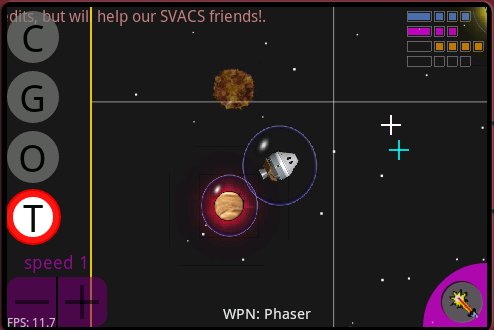
The game supports three different 'Tactical UI Modes' (which you can select via the MENU/Settings panel). These control how you navigate your ship and how you fire your weapons, while on the Tactical Panel.
Tactical Mode: flickNAV
The default (as of R41) is 'flickNAV' mode. In this mode you 'tap' the screen at the spot you want your weapon to explode, or you 'flick' the screen at the spot you want to steer towards.
A 'flick' is a very quick touch/drag/release. It doesn't matter which direction you drag. But you might enjoy thinking of it as 'dragging space.' The important bit is that it must be 'quick' (half a second or so)
And no matter which Tactical mode you are in, "flicking" will always steer your ship, so you might as well learn that. The only thing that really changes with a Tactical mode is what happens when you 'tap'.
Tactical Mode: AUTO
In this mode (ez baby mode), you never select a weapon target at all. flicks and taps are both accepted as commands to steer you ship.
To fire your weapon in this mode, you tap the weapon selector button (lower right). Depending on your currently selected weapon, a target is picked for you automatically from nearby choices.
Easy, for babies.
Tactical Mode: DUAL
Everyone pretty much agrees that this tactical mode sucks, so you might just skip it. Still, if you are a nonviolent sort, you might like it.
The thing to remember about this tactical mode is that it is in one of two sub-modes: NAV or WPN.
NAV Sub-Mode
While in NAV sub-mode, a tap in the screen will cause your ship to head off in that direction. To enter NAV submode (while in Tactical Mode: DUAL) tap the Speed control in the lower left.
WPN Sub-Mode
While in WPN sub-mode, a tap on the screen will fire your current weapon to explode at the spot you touched. To enter WPN submode (while in Tactical Mode: DUAL) tap the weapon selector.
See, it's confusing, and hectic if you do a lot of shooting and navigating at the same time. But maybe you like it.
All Tactical Modes:
If you flick on a planet, then your ship will enter orbit when you reach it.
You see only a small portion of the galaxy while on the Tactical Panel. (you will see more when a Red Alert is in progress)
To change your speed, tap the speed + and - buttons. Your top speed will increase as you equip your ship with extra Energy Pods.
Watch out for the red energy barriers. Trying to cross them without shields will most likely destroy your ship, causing you to be teleported back to your home planet and a replacement ship from your dwindling fleet.
To change your current weapon, press and hold the weapon selector in the lower right until the Wheel appears. The wheel will then rotate and you should lift your finger when the desired weapon is in place.
Your ship may be equipped with up to six kinds of weapons at a time (but you must return to Space Dock if you wish to change which six weapons from your complete inventory are equipped).
Anyway
If you can suggest a better Tactical UI mode, I'm all ears. I want something which is easy and obvious, and preferably in the Spirit of WarPath Classic. Don't be shy about emailing me with ideas for improvement.
Shortcuts
If you have enabled shortcuts (via the MENU/OPTIONS panel), then the WPN SELECTOR will be replaced by six individual (tiny) weapon buttons. You can then tap one of these directly to change your weapon selection. (And shoot, if you are in ez-auto-target mode)
Also, when shortcuts are enabled, you will see a tiny button bar along the bottom of the Tactical Panel which gives you instant access to orbital services. This gives you one-tap access to SCAN/SHOP/INVEST/MINE and COLONIZE.
Shortcuts are for people with either large screens, or small fingers.
Planets which have declared for one of the paths will show a red or green aura on the Tactical Panel. Inhabited planets which have not yet declared will show a yellow aura.
Uninhabited planets will have no aura at all. You should mine them for their ore (which you sell to inhabited planets, who will pay a higher price if their own planet it low on ore).
You may also colonize an uninhabited planet (via the Orbital Panel while orbiting it).
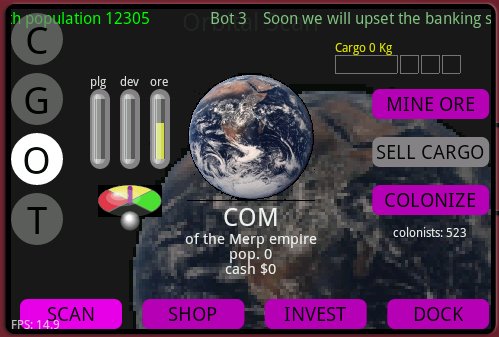
Once you enter orbit around a planet, the Orbital Panel
will offer you four modes of operation:
SCAN
Scan mode displays particulars about the planet you are orbiting, and the opportunity to mine the planet, sell your cargo to the planet, and colonize (an uninhabited planet).
SHOP
Shopping mode allows you to review what is available for sale on the planet. Each inhabited planet has factories busily churning out goods as fast as its development level and resources allow. This is where you will purchase shields, pods, and weapons.
INVEST
Investment Mode allows you to make investments in six categories: Education, Agriculture, Mining, Industry, Space Dock, and Defense.
Any investment will make the planet love you a little more, but strategic investments will enable to planet to provide more services to you.
DOCK
Space Dock Mode gives you the ability to assign your weapons inventory to the six available weapon slots on your ship's Weapons Wheel.
Your ship comes with some basic storage for:
- Energy. Your ship explodes if it runs
out of energy. Energy is lost when you take on
damage. Energy recharges slowly on its own (if
you stop your ship) but can be refueled by a
planet's Space Dock (as soon as you orbit the
planet). A high investment in Space Dock will
allow better refueling. Your ship comes with one
Energy Pod and you can buy up to four more.
- Charge. Charge is used to power some
ship activities, like Stealth Invisibility
Shields (you become visible if you run out of
charge). A small amount of charge is also needed
to launch weapons. Your ship comes with one
Charge pod and you can buy up to four more.
- Cargo. When you mine ore from an
uninhabited planet, you have to store it
somewhere. You store it in a cargo pod until you
can sell it to some inhabited planet.
- Shields. When a weapon comes in contact
with your shield, a shield absorbs half the
damage (your ship absorbs the other half). Your
ship comes with one shield, but you can buy up to
four more. Each additional shield layer cuts the
damage by an another factor of two. The outermost
shield, however, will heat up and if it is not
given enough time to cool down it will pop,
leaving you with one less shield than you had
before. NOTE: while
orbiting your HOME planet, its shields protect
you. But while orbiting any OTHER planet, its
shield INTERFERE with yours, reducing their
effectiveness by 50% or so. This is to discourage you from
squatting in orbit instead of staying in active
combat :)
- Weapons. Your ship comes with six possible weapon slots on its Weapons Wheel. (Think of it as a six shooter with a different kind of weapon in each chamber). Your Phaser (energy beam) weapon is permanently equipped in slot 0, but you can dynamically associate any combination of weapons in the other five slots (using a Space Dock).
In battle you use the WPN Selector in the lower right of the Tactical Panel to select your current weapon (hold it down until the weapon you want rotates into place)
The Galaxy Panel also offers four modes of operation:
MAP
This map shows the entire galaxy. Clicking in the map will set a course in that direction. But be careful to not inadvertently cross the Galactic Energy Barriers without proper shielding.
HISTORY
The history of the Galaxy is shown as a collection of graphs showing aura counts, populations and Tek levels.
PLAYERS
This screen recaps the status of you and your competitors. Clicking on a player's tile will put you back on the Tactical Panel but with the point of view of that player. (Unless they are stealthed). Attempting any ship controls will return your point of view to your own ship.
GUIDE
If youhave the money, and the tek level, you will be able to buy a Galactic Guidebook which remembers information about all the planets you have orbited, including how much they are currently paying for cargo, and their current development level and population.
It also provides an easy way to lay course to the planet of your choice.
Planets will eventually start issuing distress calls to you and expect you to come help them as soon as possible, or they will begin to lose their love for you.
If you have a Diplomatic Radio, the button to activate it appears on the Guide Panel (so you also have to have a Guide). You do not need to be in orbit to use the radio, you can call the leader of any planet you have listed in your guide.
As the total population of your Path rises, it will unlock higher 'tek' levels. (Up to Tek_9)
Planetary factories can only manufacture items within their Path's Tek Level, and within the planet's Development Level.
You raise an individual Development Level by fully investing in all investment categories on that planet (at which point it reaches 100% development).
Your Path's tek level also affects the power of equipped weapons.
After showing the amazing WarPath title screen, the game asks you to pick a save slot (known as a "Captain's Log"). The game will automatically save the galaxy state in the selected slot when you shut down the game.
You get multiple save slots because you might want to maintain a small stable of Enlistment characters (Say "Ensign Kl'arg of the Klepton Empire, fighting for the Path of War.")
Now say that ten times, quickly.
Anyway, each time you start the game you have the choice to resume from one of the save slots, or to start a new solo mode game in one of them.
When starting a new game you will be able to pick your character's name, empire, path, and ship design. Just tap in the window to change your selections.
When playing online multiplayer, you pick a Captain's Log to set the name and ship you will be playing with, but the contents of that Log will NOT be overwritten by the multiplayer game status.
The game is for two to four players of any mix of paths and empires (so long as each path is represented at least once, since the game will end if all ships of a path are destroyed).
Once you start the game, it will contact a master server and accumulate other players, filling in bots as needed for the empty quadrants, depending on the Multiplayer Rule Set you selected.
Once you and the other players have been assigned your starting quadrants the game will launch simultaneously on all player's screens, so get busy!
Note that even in 'solo' mode (you playing with 3 bots), these same actions take place, so you are not completely aware of whether you are playing in solo mode or not.
The servers are now online, though it is still relatively hard to find someone else to play with if you don't arrange it with them in advance. Just not enough players yet.
The SCAN button, while orbiting a planet, provides information about that planet. If it is an uninhabited planet, pressing the MINE ORE button will use special mining beams to collect surface ore and store it in your ships cargo pods.
An inhabited planet will make you an offer for your cargo and the SELL CARGO button will accept that offer. This is your primary means of earning money early in the game. Money you need to shop for equipment, or invest in planets to make them love you.
As you orbit inhabited planets, your ship picks up colonists (people who are unhappy with where they are). When orbiting an uninhabited planet, the COLONIZE button will drop loads of colonists (100 at a time, up to 500 max) from your ship to the sterile, bleak, landscape below. They probably immediately regret their decision to travel with you.
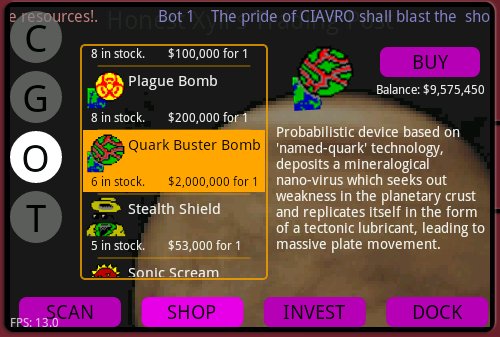
While orbiting an inhabited planet, the SHOP button on
the Orbital Planel will show you what its factories have
for sale. Just tap and drag the item list to find what
you're looking for, then press BUY to purchase some
number of that item.
Note that your ship has limits as to how many of each item it can carry. Plus you have to be able to afford it, of course.
And the factory may not have manufactured enough of the item yet for you to purchase any (you can speed that up by investing heavily in manufacturing, and making sure the planet has lots of ore)
Be sure to stock up on:
- Shields, as many as possible
- Energy Pods, they extend both your life and your max speed
- Cargo Pods, you can carry more cargo, so more money earned in fewer trips
- Charge Pods, let you launch weapons faster, and rin Stealth longer.
- Ship's Radar is very useful
- Galactic Guide is very useful
- Sonic Scream is a dual-edged sword (lowers shields of any planet or ship in range, including your own!)
Most possessions are lost if your ship is destroyed, but some remain with you for the rest of the game (radar and guide, for example).
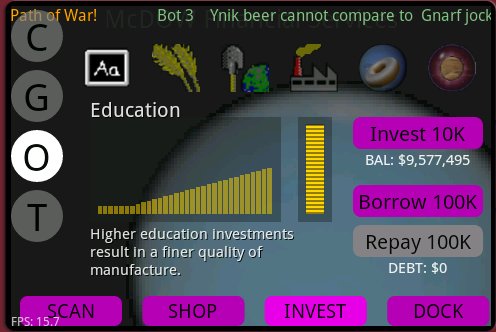
While orbiting an inhabited planet, the INVEST button on
the Orbital Panel will show the investment screen. Each
planet must be invested in individually, and this is the
primary means of buying a planet's love.
Just click on one of the six investment categories and then press INVEST 10K to make a 10,000 credit investment in that category. The 'stack of coins' meter will indicate when you have maxxed out that investment category. The chart to the left of that will show your investment taking effect (takes awhile for your money to bear fruit, as it were).
This screen also allows you to borrow credits (and repay debt). This is only for emergencies, and you will be blocked from making any additional investments until after you have re-paid all your debt.
The amount you can borrow is set by your current Credit Limit (which increases the more you invest).
As of Release 44, the INVEST 10K button is now the INVEST 50K button, allowing you to invest a full category in one tap.
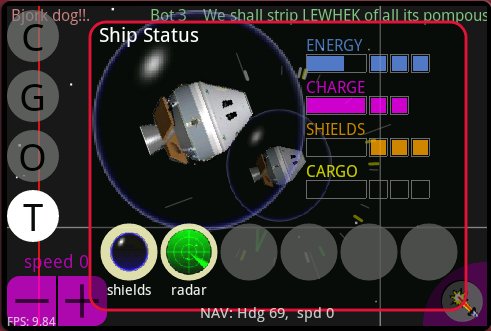
Once you have equipped your ship with shields, radar, stealth, and other items which can be turned on and off, you might be wondering "how do I turn them on and off?"
The answer to that is the 'Ship Status' screen, which you open by pressing the Tactical Panel selector a second time while already viewing the Tactical Panel.
While the Ship Status screen is displayed, you may turn on and off these ship extensions. To close the screen, just tap the Tactical Panel selector again, or click anywhere in the status panel (outside of a button).
NOTE: The Sonic Scream button (not shown) has a timeout, limiting how often you can use it. Each scream lasts for only a few seconds.
This screen also gives a more informative view of your ship's energy, charge, shield, and cargo pods.
This is an add-on for your Galactic Guide (so you have to also have a Guide installed).
You can think of this as an alternative to investing in planets, as a way to earn love. Though since it is a form of gambling (it can go horribly wrong and backfire), you are advised to continue investing and only use this if the planet is full invested, but still not following your Path (which can happen if both Path's are investing in it).
Basically you just open the Guide, select a planet from those you have encountered, and click on the radio button to open a comm channel to the leader of that (inhabited) planet.
Various buttons will appear and allow you to carry out an interactive dialog with the leader.
Aside from just chatting with a friendly planet, you can attempt to THREATEN or BRIBE a planet which is not already following your path.
Once you start to bribe a planet (assuming its leader turns out to be bribable), you are basically negotiating on the price. If you're willing to pay the exorbitant initial price, you will always win. Otherwise, your goal is to knock the price down to something reasonable. But if you try to go lower than the greed of that leader will tolerate, then you will fail.
Success leads to a chunk of love for your Path. Failure pushes the planet to the opposite Path. It takes several successes to fully ally with a neutral planet.
Threatening is similar, where your threat credibility struggles against that particular leader's cowardice.
Hopefully it's fun. But again, it's a form of gambling, so don't get addicted! (Gambling for love, not money). Well, OK, bribery consumes some of your Galactic Credits (the price you agree on, if any). I just mean it doesn't cost you any REAL money. In case you were worried.
There are options available by pressing the android 'menu' button and then selecting 'Settings'
- Sound: Off, quiet, and normal
- Solo Mode Difficulty: Easy (you and two friendly bots against a third), Normal (you and one friendly bot against two others), Hard (you against three bots).
- Bot brain control (sluggish-dumb to agile-wicked)
- Enable/Disable popup 'hints'
- Enable/Disable bot 'chatter'
- Select 'UI Mode' ('Easy' auto-target, 'modal', or 'expert' modes)(controls how you switch between NAV and WPN modes)
- Enable 'shortcuts' (small buttons on Tactical Panel for instant access to weapons and orbit services)
- [someday] Game Over criteria: last player standing, last planet standing, highest score after N minutes, etc.
- What is the
point?
The point is to have fun of course, but the game over definition is: you ran out of ships, or you ran out of planets, or you ran out of time and had the low score. I might add 'you lost your home planet' as an optional condition. The multiplayer rule sets offer the possibilities of lots of specialized modes of play (capture the flag, etc)
- How do I
dogfight?
Locate an opponent (galaxy map and ship radar can help there), select a weapon and enter WPN mode (using the lower right weapons selector), use 'flick NAV' to move around, and tap a spot your enemy is heading towards, in an effort to time an explosion to occur exactly when they get there.
- What is
'Flick NAV'?
While in weapons mode, a 'tap' on the screen will fire your current weapon, but a 'quick tap then drag a little' will navigate. It might help to think you are trying to drag your destination to the center of the screen, but all that really matters is that you tap-drag-release all very quickly. Once you get the hang of it, it is easier than tapping back and forth between NAV and WPN modes.
- How do I
save a game in progress?
You picked a Captain's Log when you started. Your solo game will be automatically saved to that Log when you exit the game. So just hit the android BACK key to exit the game. Only SOLO mode games are saved. (When you pick a Captain's Log and then play multiplayer, it just uses your name and ship from the saved SOLO game)
- Why do I get
to have multiple Captain's Logs?
Good question, it just seemed like more fun that way. I'm sure it will eventually be confusing since Achievements, Unlockables, and Stats are global to all your Captains (and not erased when you start a new solo game in an old Captain's Log).
- How do I
pause the game?
You can't pause in multiplayer at all. A HINT will pause you in SOLO, but there is otherwise no way to pause the game on purpose. I will probably get around to adding a SOLO pause someday. You can always quit the game completely (android BACK button), then resume it later.
- What about
having more players?
It's a four player (max) game to its core, and android screen real estate isn't going to make it friendly to have more. But if someday it supported a 'drop-in' multiplayer mode, I could revisit that, for a simplified combat-only mode.
- How about
Gambling?
Social functions might come sooner than you expect (or not) but gambling per se is currently available only as a means to subvert planets which have already been declared for a path. You would, in that case, attempt a feint with the local government (bribe, blackmail, philanthropize,...) with a semi-unpredictable outcome. This requires the DIPLOMATIC RADIO extension to your GALACTIC GUIDE.
Warpath for Android is a work in progress. I am porting my original game "Warpath" (for Windows PCs) to the android platform.
For more information about Synthetic-Reality.com, please check out our web site.
The game is fundamentally the same, but re-factored to work in a reduced screen size and with only a single clicking device (no right mouse button!)
- You have a name, rank, path, empire, and ship
- The Galaxy has 4 quadrants of 16 sectors each
- You start with a bunch of unaligned planets
- You encourage planets to follow your path, by inspiring/hitting/investing/bribing them
- You fight human and robot opponents in the process
- You Invest/Mine/Shop/Equip/Colonize
- Whoever has the most planets/population/money/love after some period of time, is the winner.
"Hammurabi meets Trek"
Unlike Classic WarPath, there is no 'right mouse button' so first you select your weapon (click on phasers), then you select your target (click on the point in space you want to shoot).
If your target passes through that point at the same time as your weapon, you score some damage.
There are lots of subscreens to navigate between, which I hope will feel a bit like mini-games.
Navigation requires you to select 'NAV' as your current weapon, then click on the screen where you want to go. Your ship then heads in that direction until you change it.
If you click on a planet (while in NAV), then your ship will enter orbit when it gets there.
While in orbit, you interact with the planet (mine, colonize, shop, spacedock, etc.)
- PNG files of arbitrary size!
- alpha!
- OGG!
- MP3!
- threads!
- web!
This is the Honeycomb Tablet-friendly release. I had the good fortune to receive a Xoom (which I love, except for the no-charge-from-USB aspect) and the bad fortune to realize that WarPath did NOT run well on Honeycomb.
Eventually I traced it to my support for Android 1.5, which I think more or less dooms you to running as a postage stamp on the tablet screen.
Luckily there are virtually no players with 1.5 phones (and if my removal of support for 1.5 leaves you unable to play, just let me know and I will see what I can do.)
Which is to say, with this release, the minimum accepted Android version will be 1.6, of which there are also not many players (most of the WarPath players have 2.1 or 2.2)
After changing THAT, it turns out I had a zillion little screen formatting issues to deal with, so I spent my Saturday recoding about 40 UI screens so they look nice both on the Xoom and on a smaller-screen.
Unfortunately, these changes were major enough that I might have inadvertently introduced NEW bugs. Yay! So I am going to test it for a bit longer before releasing it.
- Honeycomb (Xoom) Friendly (and it's fun not squinting!)
- Many UI Presentation Tweaks. Hopefully they make the interface look NICER.
- No longer supports Android 1.5 (sorry!)
- You can no longer turn on radar when you don't own it (oop!).
- You can no longer accept a proposed Bribe if you don't have the credits to cover it.
- Moved the "Last Taxes Paid" from the player screen to the history screen, and added a meter to let you know how long til the next taxday
- Fixed a bug which would let you accept a bribe adjustment that was more than your credit balance
- Stealth and Scream now consume charge as intended, while on.
- Fixed a problem selecting the last item in the shop on some phones
- Dead planets will no longer retain any manufactured goods when re-colonized
- Planets will no longer target you when your Stealth Shields are on.
This was another quicky to fix plague bombs, which were fairly completely broken. I also added the WarPath classic "sickness visualization" for severely plagued planets.
This is just a quicky release to add the 'review achievements' dialog (use your phone's MENU button and select ACHIEVEMENTS).
In case you're worried, I moved the secret YouTube feature to the FUN button on the STATS dialog. :-)
This release introduces "Achievements." Currently you just earn them (you can't review them later, so enjoy them when they happen). I only added a handful of achievements to start with (so don't go crazy trying to find them all).
Once we're sure they don't crash, I'll add more. And I'll add the review screen.
This is the "easier to get where you want to be" release. Plus a few more member suggestions:
- You could always navigate by tapping in the Galaxy Map, but now when you tap, it assumes you probably wanted to orbit a planet near the tap, so it 'snaps your tap' to the closest planet. Unless there are none close enough to be a reasonable guess.
- Galaxy Map shows a little orange ring around your current Orbit destination (so you can see which planet it thought you meant). It's nice.
- Galaxy Map shows a little star behind your home planet (Can't believe I forgot to do that) so you can find your way home without leaving breadcumbs in space.
- I zoomed the tactical panel out a little bit (not so far as in Red Alert mode, just enough to feel a little less claustrophobic)
- Ship Shields are a skosh stronger against weapons. People pull this in both directions... eventualy maybe we will achieve balance.
- Dead Ships no longer lose any shields or energy pods (for dying, I mean... you probably DID lose some shields BEFORE you died)
- Major Weapon damage can no longer blow off an energy pod. (Charge and cargo are still fair game)
- Investing now does $50K per tap, so you can fill an entire investment category in one tap (instead of five)
- The Settings panel no longer sports the Happy Alien icon (which was using up a lot of the real estate. I really hate the android options panel now. Henceforth I will always 'roll my own' as I am doing in Rune Runner.
- Pressing your phone's BACK button while on the COMM/GALAXY/ORBIT panels will no longer exit the game. It will just return you to the TACTICAL panel (I have a feeling newbies are forgetting (how) to return to Tactical mode.
A small release, but a good one. My FAVORITE addition is the link to the YouTube video of "a modern US president" (which is fantastic).
The REAL raison d'release is the addition of the SHORTCUTS option. You turn these on via the MENU/OPTIONS panel.
When on, the WEAPON SELECTOR in the lower right is REPLACED by six individual (tiny) weapon buttons along the right side of the screen. This allows you to directly select individual weapons (from the six installed on your ship). Just like WarPath classic. You can thank me later. But only if you have tiny, accurate, finger tips (or a large phone screen).
Also, this adds five shortcut buttons along the bottom which give you one tap access to orbital services like: SCAB/SHOP/INVEST/MINE and COLONIZE. Note that I didn't include SELL CARGO. I'm just mean.
Release 42 (oops) had:
- A small cleanup of the Empire Art. (those alien faces people hate to love). As usual, I accept (royalty-free) art donations, if you hate them so much! That goes for ship designs as well.
- Android 2.2 phones can now use the "Move to SD CARD" feature.
- Fixes a but where tax income would cease if you re-used a captain's log without restarting the game.
Yeah, R40 had no notes :-) This is beause it was an 'emergency' patch pushed about an hour after R40 to address a showstopping bug. Except it seems that maybe the bug didn't really exist in the first place. Lessons to learn:
* Always test your work, no matter how small the change (I knew this already, of course)
* Well, it would be impolite to say thing #2
In any cases, two major bits of news in this release (which didn't take FOREVER, just a couple weeks longer than I expected :-)
The First Big Change is that the "flickNAV" uiMode is now the DEFAULT. (You can still choose all three ui modes via the MENU/Settings, but new players will now default to flickNAV)
This seems to have been the least odious format that still gave you full control of your weapons (easy AUTO mode is still available for anyone who doesn't like to aim anyway)
I noticed lots of new players remain unaware that they have ui choices, and were complaining about the admittedly hard-to-use DUAL mode (the original, and old default, mode). So now we'll see if they complain about flickNAV.
I added some more specific HINTs about the ui modes, which I hope will be less confusing than rubbing your nose in DUAL mode right away and confusing you further.
The second 'big change' is the addition of the "Diplomatic Radio" which is sort of a form of gambling for the love of planets.
The problem I was addressing was "After a planet is fully invested, there is no good way to influence its Path alliance, short of destroying it (which is still an option).
The Diplomatic Radio (You have to also have a Galactic Guide and that's where the radio button shows up), lets you open a communication channel to the leader of any inhabited planet.
Depending on the planet's Path alliance, you will have different options, but basically you can choose to just shoot the bull (already in your alliance) or you can threaten and/or bribe the leader, in the hopes of moving the love meter a bit in your Path's direction. If you're successful, you get a major chunk of love (though not necessarily enough to commit them to your path in a single go). If you fail, then you actually push them towards the opposite path.
Anyway, something else to do. I know the game wasn't complicated enough already :-)
These notes are getting redundant to the notes built into the game, so I will focus less on the basics and more on the back-story, I guess :-)
I have this 'secret' YouTube player which I have BIG PLANS for (which may never come to pass, hence its secrecy!) Anyway, I based it on some code some other dood did, and he used a Google API from the dawn of time, one that Google said it would no longer support after 2005 and.. by gum, true to their word, 5 years later, Google 'suddenly' stopped supporting the API. And my secret youtube player stopped working.
So I read up on the CURRENT api, which I think they now more or less promise to never change (and it is a nicer API) and did as little as I could to support it. I could work a little harder on it, ande maybe someday I will, but it seems to play videos just fine again, and that's all I care about for now. And now that android 2.2 supports flash, I have even more possibilities.
Then, I noticed when testing quicky multiplayer games, and winning by dominating my opponent, I would often see it say that I had LOST ratings points instead of GAINING them. Ack! This turned out to be easy to fix, so I fixed it. Feel free to blame your low chess rating on this.
Even with all the recent changes, it is still too easy to defeat your opponent by killing him once, then racing to his home planet and killing him again while he is still weak. It finally hit me that in my original PC version, I used to allow an orbiting ship to benefit from the planet's shields. I inverted that in the android version because I didn't want to encourage people to sit safely in orbit. But that added to this 'quick kill' sensitivity. So NOW, it works like this:
- While orbiting your HOME PLANET, you are protected by its shields (as long as it has them)
- While orbiting ANY OTHER PLANET, you are NOT protected AND your ship's shields are cut in half (due to 'interference' from the planet's shields). Metaphorically your HOME planet's shields are 'in phase' with yours, but no other planet has that benefit.
And the NEW FEATURE (sort of) in this release is the SONIC SHIELD DISRUPTOR (which has been available for purchase since day one, but I gave you no way to turn it on! But now, you can!
- It's a ship extension, so you have to buy one, and it's hi-tek so someday it may not appear until you build up your tek levels
- You activate it via the SHIP STATUS panel (same as your shields and radar)
- It only lasts for a few seconds (10 at the moment, let me know what you think)
- You can't use it more than once a minute (button gets a little timeout 'circle')
- It has a range of 1/2 sector (lemme know what you think)
- ANY SHIP IN RADIUS WILL LOSE ALL SHIELDS UNTIL IT GETS OUT OF RADIUS.
- EVEN YOUR OWN SHIP
- Any planet in radius will lose half its shield layers until out of radius (and the planet isn't moving)
- EVEN FRIENDLY PLANETS
This thing is a shield disruptor. All shields. It's definitely a dual edged sword. But I DO let you turn it off, rather than leave it up for the full period, if you sense some emergency.
And that's that for R39... still working on Zombie Armies, I promise (always nice to have more planet attacks).
I guess this is mainly a new UI release. I've added a new option to the options screen: UI MODE
This can be set to one of three values (and the idea is to keep adding to this until I find something people agree is perfect, and then make that the default)
DUAL mode
This is the original version, where the Tactical Panel is EITHER in NAV or WPN mode, and a tap in the panel either sets your course or fires a weapon, based on the mode. This is still the default, just to avoid deranging people.
AUTO mode
This is an 'easy' mode where you are basically always in NAV mode, so a tap in the tactical panel always just sets your course.
To fire your weapon, you have to tap in the weapon select button (bottom right). So tapping it is your 'trigger' (and holding it is still how you change weapons). But you no longer are controlling where the shot is fired. The game will try to automatically pick the best ship/planet position on the screen to attack. This is actually kinda fun if you just like to melee, as it were. It's for babies!
FLICKNAV mode
This is the 'professional warpath player' mode for all the leet players. Here you are permanently in WPN mode, so tapping the Tactical panel fires the current weapon at that spot.
To navigate, you have to 'quick flick' the spot you want to go to. (touch, drag, release, really fast). It doesn't really matter which direction you drag towards, your course will be set towards your original finger contact point.
The other things I want to have in this release (I am writing this in advance of doing the work, though), is to make sure the bots lose interest in fighting you should they manage to kill you (rather than have them follow you to your home planet and attack your newbie ship right away).
Also, when you fire the last shot of your currently selected weapon, I want to automatically spin to the next available weapon slot... possibly with some sort of understanding of ship vs planet weapons... Or maybe just always revert to phasers... anyway, do something. :-)
Note: Please send me an email if you have a specific idea for improvement.
Having said that, recent comments posted in market seem to be mostly concerned with:
- too hard to navigate in battle
- battles are over too quickly
Unfortunately, I need a little more detail to take effective action. In particular, I would like to know if you (people who feel navigation is too difficult) are using the 'flick NAV' trick (i.e. staying in weapons mode all the time), and the flick is too difficult to master. Or if you're using classic NAV/WPN mode and it's a pain constantly switching back and forth.
I prefer flick mode, myself.
As to battles ending too quickly, I'm making various tweaks here and there. One thing which is apparent is that if you DO get killed (or you kill an enemy), his ship is reverted to total newbie status (no shields, no weapons) and is way to easy to kill a second time.
Also, firing a cluster of weapons is similarly over-powered (I mean, you can fire off all N torpedoes in no time at all -- not necessarily a good strategy, but very effective against a stationary target.)
I also have reason to believe that a lot of players don't actually grok right away just how dangerous it is to cross the Galactic Energy Barriers. While they are a key part of the game (multiplayer in particular), maybe they are too harmful. Especially when you are trying to escape from a fight. I wonder if I should make it 'free' to return to your own quadrant...
So, in this release:
- When your ship dies, you get to keep 2/3rds of your stuff (instead of 0). So 2/3rds the shields and weapons in particular. So hopefully you are not a complete dead duck after loss of your first ship.
- Firing a missile weapon now uses much more charge (causing you to run out much more quickly, limiting how many missiles you can fire in a single cluster.
- But your charge recharge rate is similarly increased, so you can fire the same number of "missiles per minute" so to speak, just not as many "missiles per second". You still recharge even faster when stationary.
- the definition of a 'flick' should now scale with your screen dimensions, and generally require 'less' of a flick 'distance' (hopefully this won't lead to 'false taps'
- Energy Barrier damage considerably reduced. (about 50%)
Anyway, don't hesitate to pop me an email with any ideas! It's a lot more efficient than chatting in the Market Comments (which is, of course, also OK)
I don't know if this is a new feature or not, but Google sent me an automated crashdump it collected from some player. That's pretty cool! It includes the call stack so it was easy to see where I had a possible array out of bounds exception.
Which is now fixed, instead of just lurking, waiting to crash someone else.
This release also adds that excellent suggestion of replacing the MINE button with the EZ-Read version of the current cargo offer (when appropriated). So your MINE button isn't gone forever, just hiding until it's needed.
I was also motivated to deal with the issue of all the weapons using that same yellow glowy image when launched (other than the Seeker, which got the nice steerable torpedo in the last release).
So now every weapon looks a little different.
Unfortunately they still mostly all sound the same, and have the same explosion, so there's room for improvement there.
Zombie Armies didn't make it for this release (I am trying to do bi-weekly releases), but we're still excited about the idea, Rikatee.
It's a bit of a puzzle to work out what to do, but just press the (C)omm panel button, then notice the vaguely keyboard-shaped icon in the upper right. Tap that to open up the keyboard.
Yes, I implemented my very own keyboard. How reinventing-the-wheel is THAT? I needed to keep things 'in-game' (that's my excuse anyway). So tap a sentence (limited to 80 characters or so, and just my favorite characters to boot. Sorry 'foreigners'!)
Anyway, press SEND and your chat will be recorded in the (C)omm log, and sent to the scrolling marquee of all players. Wewt. No dirty word filter (yet) but the Terms of Service clearly state you should keep it clean when playing multiplayer.
Which brings us to Release 35.
The signature addition in this release is the completion of the Hunter/Seeker torpedo (and the necessary plumbing to make it possible, which also enables other weapons to someday have seeking capability).
The seeker acts a bit like a mine at first, traveling to the spot you tapped. There it lurks, waiting for an enemy to get close enough (which won't take long if you shot it at an enemy in the first place).
Once engaged on a target, it will pursue that target until it is dead. (the target or the missile). If it ever gets close enough, it explodes.
Now this feature also plays homage to WarPath classic in that these seekers are 'local effects', by which I mean to say that in multiplayer, each of you sees your own copy of the missile, and it is free to make its own decisions, and might actually decide differently, from the perspective of two players. In a two player game, this is unlikely, but in a three player game, it could be launched to a point near two enemy players and could pick a different target on each machine.
That probably doesn't make any sense, but I point it out for intellectual curiousity purposes.
r35 also has quite a few internal changes you should not notice, plus a couple cosmetic ones (new game_over_win music) that you will.
I fixed a bug on the Captain's Log page where clicking on one captain's name would actually show you the summary for an adjacent captain instead (but since I showed so little info, it wasn't obvious). I fixed that and added some additional information about the saved game.
Shields still felt a little too difficult to pop, so I lowered their max temp a little. Maybe they are too easy to pop now..
I extended the duration of Red Alert. Also, if YOU keep shooting, it will prolong the alert, even if you take no damage. This was to make the 'no re-fueling during duel' make more sense.
Also, I made it so home planets cannot be too close to the galactic barrier. For two reasons, one to make it harder for newbs to blow themselves up immediately when they neglect to buy shields and pods, but also because if two players had home planet's just on the other side of the barrier, you could get into an early-game Red Alert which prevented you from re-fueling (unfairly).
I played with the ship life meters more. They now are colored to match the ship's path (you still have to remember which path YOU are playing). I tried having the war path curve down (frowny face) which I thought was brilliant, but it just looked too crappy. I like the curve of the meter matching the curve of the shields.
And the BIG CHANGE with this release is that planets that hate you (aligned with opposing path) will now shoot at you when you get too close. They have a max range of about 75% of a quadrant, but only reach that range when their DEFENSE investment is maxxed out. The frequency with which they shoot at you increases with their hate (which is also how much they love the other guy)
It might be too easy to be killed by planets so let me know what you think.
Several of these changes make r33 players incompatible with r32 players, so if you DO have the mis-luck to connect to an out-of-date player, you might crash them inadvertently (but once everyone updates, we should be cool). Eventually I will have the server mandate the newest version probably. r33 and r32 players will also disagree as to the location of the home planets.. which is disturbing :-)
I still can't explain why my multiplayer bug didn't mess up EVERYone. It only affects certain android builds, apparently. I think it means there is a bug in android which allowed it to work, but they fixed the bug and now it wouldn't? It's very strange. I mean the code was literally:
a = 0;
if( a == 0 ) fail();
It's just impossible for it to have worked.
Impossible!
the MENU button has a 'Statistics' choice where you can scroll through a long list of stats. Of course, they will all be zero to start with.
The idea is that Stats drive Achievements. But I have no achievements yet, so you just have to enjoy the Stats on their own merit. Some of them are appropriately silly.
However, you will also see in the Stats (and on the Player Panel) your 'rating'. This is a numeric rating, using the Chess "Elo" algorithm that goes up when you unexpectedly beat a higher-rated player (and goes down when you unexpectedly lose to a lower-rated player).
I hope no one gets too caught up in it. All games are rated (even Bot games in solo mode), so it's not the be-all and end-all of ratings. The Stats panel also tracks the rating of each Bot brain type (fodder, feisty, etc) which I admit to some curiousity about.
A significant change in this release is that your own weapons no longer hurt you. I felt bad above removing that as I feel it adds a certain something, but often that certain something is just irritation when you're chasing the enemy and naturally fly through your own explosions. Anyway, it's easy enough to make it a rule-set option, so eventually one could have 'hard mode' rules, as it were.
So if anyone still thinks the bots are unbeatable, I would like to hear about it!
And I just added support for playing YouTube videos (which added a couple more android permission requirements which I hope don't scare anyone off). I have a secret plan where playing videos would be advantageous, and I didn't feel like doing anything else tonight, so I went for it. It currently serves no purpose, but until I have a real Achievements Panel, I will play a video when you select 'Achievements' from the MENU.
- ORBITED (all planets you have orbited, but not if they hate you)
- ORE (planets you have orbited which either are minable, or would buy cargo)
- DEV (planets you have orbited in which you could invest)
- ENEMY (planets you have 'seen' (been within a sector of) that hate you)
- EXPLORE (planets you have 'seen' but not 'orbited' and hence you know nothing about them other than their image
The actual data fields displayed will vary with the category. I plan to add DISTRESS (planets in distress) and some sort of CALL function to let you open a comm channel to the government of that planet (also will be available on the ORBIT panel when in orbit). I have 'plans' for some sort of story/quest-y opportunities with planets (more ways to influence them, especially after they have been fully developed.. subversion opportunities or just some crazy stoopid conversational fun)
I also include a 'distance' value for each planet (measured in 'sectors') but do NOT auto-sort on distance (I have my reasons).
I added a new menu command "Release Notes" which opens a little dialog with a brief summary of changes in each release (going forward). It should open automatically the first time you run the game after an update. Or you can open it at any time via the MENU button.
New Battle restriction. It is still perceived that bots (and other players) are just too hard to kill. (which is sort of cool since WarPath PC players complained that the bots were too easy to kill). After some statistical analysis, I have decided this is mainly due to the Bots willingness to run off and refuel as soon as they take some damage. With this release, orbiting a friendly planet will NOT refuel you (nor auto-shop) during a Red Alert. This is, I claim, the Moral Equivalent of "I am in a duel and cannot heal until the duel ends". So if you are really close to dead, you need to just keep trying to run away until the Red Alert clears. (and so does the bot). I hope that helps!
OK, it's definitely too easy to kill the bots now (at least with big torpedoes). We'll leave it like that for a bit so people can have the opposite experience for awhile.
This release is mainly about filing off some rough edges with the server system. Player "Ben" is still the most successful at finding on line opponents, with player "Vulgar" being the most likely to just miss someone.
I continue to be pleased with the improved clock synchronization and the apparently successful conversion to the android 'nano clock'. Even with horrible 3gs latency the clock has been syncing well.
I do see a lot of connections dropping however. I don't have any real way of telling if the user initiated them, if the game crashed, or if they just lost their 3gs connection. If you're experiencing any crashes, PLEASE report them via the google group (link at the top of this page).
I think the weapons (phasers, torpedo, big torpedo, mine, and big mine) are fairly nicely balanced now (both in hit points and in purchase price). Learning to 'flick NAV' (in weapons mode) is key to having a satisfying dog fight experience. And be sure to 'lead your target' (shoot at a spot in front of them, so your weapon explodes where they will be, as opposed to where they were). Bots will get some aiming logic eventually so right now you still have that advantage over them.
Planetary weapons are NOT balanced yet.
I guess I should be flattered to see some users with stolen copies of the game. But I'm not. Don't kid yourself that you're doing me any favors or striking a bold blow for the good of humanity. You're just stealing a couple bucks. How pathetic is THAT?
To which I have to add, I continue to be grateful to the hundreds of players who have shown confidence in the future state of the game and basically paid to take part in the Beta testing. That is terrifically nice of you and I hope not to let you down! Please don't hesitate to let me know things you would like to see added.
And finally some progress balancing the damage economy. First with a little more visibility of what's going on. Ships now have 'life meters' (a little semicircle below the ship that reduces in size as they run out of life energy). Plus the shield color will now vary with the temperature of the outer shield layer, so you can get an idea of how close you are to popping it. Thanks, Ben, for encouraging me to do that. Eventually I will make the life meters invisible when not in battle, but right now I enjoy seeing them.
I changed the distance calculations for weapons damage from a pure inverse-squared computation to something more like an invisible dart board. Close enough to the center and your weapon applies 100% damage, with (invisible) bands around that for 50% and 25%. (this is before applying the shield protection). This feels better in general and is probably also more fair in a high latency game.
Having said that, I improved the clock synchronization in multiplayer mode so even in high latency you are surprisingly well informed as to the location of your enemy.
I found a silly bug which was wasting a consider portion of the compute budget (thanks, TraceView!), so you should get 20 frames per second again on most phones. Likewise I boosted performance in multiplayer where a helper thread was unnecessarily hogging cycles.
The AI now should show a little more variety in its planet destination choices (bots used to have a tendency to all pick the same destination, so they just flew around in a pack forever)
The bots will no longer invest/trade-with planets of the opposing Path. (Likewise, you can no longer shop/invest on an enemy planet)
Synchronization of ship state is a little tighter in multiplayer now (I didn't use to share the exact energy level, since you couldn't see it, but now that you have a meter, I have to propagate it.)
Found a cute bug in the log panel (and rules panel) that would show up if you held the phone in portrait mode while starting the game.
Had a brilliant idea that multiplayer rule sets were another candidate for 'unlockables' (so you have to have achieved a certain level of skill before being allowed to pick certain multiplayer game modes) But I am still limiting the game to one rule set until Max, Vulgar, Ben, and Tom stop just missing each other on the server :-) (That's Ben2. Ben1 is my son.. I played a few games the other day with Ben2, thinking he was Ben1, leading to some complicated mis-understandings between Ben1 and myself)
Oh, I broke with WarPath tradition and started changing some colors. Energy is now Red. and Charge is now Blue. This is more in comformance with the well established standard colors of life and mana :-) I originally avoided red since it was intended to mean the red path, but well.. it's just too darn important of a color to avoid in obvious places.
That's probably enough to change in one release, but I feel I need to do something about shields. Four shields with a factor of 2x protection each is really too invincible. But it might be nice in 'easy' mode. My choices are:
- reduce the max shields.. say.. to three
- reduce the effectiveness of each shield
- have something progressive like the FIRST shield is 2x protection, but the SECOND is only 1.5, the THIRD is 1.25, etc.
Frankly, I think I can do whatever I like and keep claiming they are 2x and you'll never know the difference! I will just tune that a little more tonight and then push r29
The server logs show people continually missing each other. I believe I am the only one to actually be present at the same time as another player and to have launched a real game.
I added a server setting to the options, on the off chance that is needed someday, but you should leave it blank so as to get 'the right server' (the one with a chance of having other players on it). But this lets me maintain a Beta Server separately from the main server(s). So I no longer have to shutdown the main server(s) when working on the code.
The game is surprisingly playable even with high latency (wifi generally has lower latency than mobile). There are still some clock-synchronization issues as Verizon tends to send random clock corrections of several seconds in mid-game. While I am not using the 'absolute' time, I do depend on 'relative time' being pretty regular, and it isn't. So I will be switching to a different clock source.
But I think I should get back to the battle economy so that it is actually fun to shoot each other. For me, that has the following priorities:
- more blood thirst in the AI (have them come seek you out, and cross the Galactic Barriers when they're ready)
- Fix my general tendency to buy a whole bunch of ammo and shoot it all at once. I should encourage more thoughtful shooting (you would think running out of ammo would be enough :-) I think I might need a launch delay (maybe varies with weapon) that limits your shots fired per second or something. I will hold off on that, though. It's definitely fun to shoot bursts
- I don't know what I was thinking when I had the planet's shields protect you while in orbit. It encourages you to sit in orbit. I hereby declare that interference between your shields and the planet shields actually REDUCES your shield efficiency (not completely) while in orbit. So you are now encouraged to stay OUT of orbit, when in battle.
At least for starters... then planets attacking you, drone ships, working hunter-seekers, etc.
Oh, this release will no longer pop up hints in multiplayer mode (another source of clock synch issues, since the game pauses during hints)
And you can no longer shop at planets that hate you (well, you can shop, but they won't sell you anything)
Also this fixes a crash bug introduced in R26 (turns out it would crash if you touched the screen before the Captains Log page appeared. Thanks, James, for being impatient!)
Seriously, thanks, James! (He sent me an email as soon as it crashed!)
But WarPath also now shows up on the 'best paid' list in the Android Marketplace (admittedly you have to scroll down a bit, but hey! For a Beta Game that's acceptable!)
So this release is mainly about cleaning up the multiplayer stuff, trying to keep you more informed as to what is going on (pings, average wait times, etc.) and a bunch of server changes so I can track statistics.
I'm still researching how to get multiplayer working in 3GS mode (it seems it ought to, so I suspect a google 'permission' setting I need to add). Until then you will need to be on wifi to play multiplayer (maybe just as well since that also probably brings you closer to a battery charger!)
R26 includes auto-refueling (when you buy a pod) and the auto-shopper. If you have more than 1.5 million credits, then each time you orbit a planet, it checks what is available and automatically purchases pods (energy, shield, charge, cargo) and ship accessories (radar, guide) and keeps you topped off. This is nice when in battle and you just want to pop over to a friendly planet and restore your shields.
The multiplayer rendevous screen now has a couple numbers on it: your most recent server ping (in milliseconds) and the average waiting time for a game to start. The wait time is going to be pretty inaccurate right now, since hardly anyone is playing multiplayer (largely, I think, because of the wifi limitation). But hopefully that will go up (tell your friends!) and then this will be a useful value to look at.
I have some plans for simple entertainment while you wait, but we'll just have to see how entertaining they are.
I'm still of two minds about chatting in game.. maybe three minds:
- Voice would be the coolest, if legal.
- Text chat is probably a pain in mid-battle
- In either case, I need to worry about obscenities
I might end up having some sort of lame indirect chat, if I am too fraidy cat about the profanity issues. Indirect chat would be some button you pressed 'insult' and then it would auto-emit some 'clever' (ha!) insult on your behalf. But for now, say it with your actions!
I'm now leaning towards NOT saving multiplayer game state in the memory slots. I think they should remember your current three 'solo' games, and act only as an easy source of name/ship selection for multiplayer game (an identity, as it were). This probably should also rework the starting screens a little, which are getting a little clunky (4 clicks to start multiplayer game)
In case I didn't make it clear before, that last screen that pops up before you get into multiplayer will eventually be the screen where you indicate the sort of game you are looking for. I will have several 'rule sets' to choose from, then the server will match you up with people looking for the same rule set. Right now I only offer the one: "Million Dollar Duel" which is a two-player game where you both start out with 1 million credits (and no bots). The idea is to duke it out until one of you runs out of ships. You can invest, etc, if you like (and will probably need to do a little of that since you will likely run out of ammo)
Again, since multiplayer is so new, it helps to have just the one choice, and a two-player choice at that. The next rule set I add might be four player, with bots auto-added if it takes too long to get four players.
Rule Sets can then be another option for Unlockables. (In addition to ship designs and empire selections)
Next I thought I would re-use my MIX server (where individuals host game servers on their PCs), but that requires volunteer effort in an environment where I hope to make at least a teensy amount of money, so it didn't feel right depending on player largesse in that context. Plus, firewalls have pretty much ruined volunteer servers (and account for massive customer support)
So, that left me with running all the servers myself, which could be expensive, if not done properly. Luckily, here in the 21st century, real servers with lots of bandwidth are no longer all that expensive (albeit not free). I suspect there will be a price increase for the game sometime...
That being said, I have the servers set up with multiple domains, so I can target then both by game (I have other games!) and user-experience-selection (you can pick a ruleset for your multiplayer experience: number of players, starting money, presence of bots, etc)
The server is written in Python, using the Twisted package, (Thanks for the suggestion, Jon!) and handles both rendevous (getting together with similarly-minded players), and the game sessions themselves.
At this point, I have a working server and have played some brief 2 player games with myself. My original SOLO implementation was pretty close to what I needed (this is my nth time down this road :-) but of course not perfect. The server ended up being a lot smarter than I thought it would, hence the client could actually be a bit dumber than I made it.
Note that this is still a player-to-player game and the server doesn't really know anything about WarPath in particular (it's generic and will work with any of my games)
I will probably eventually have SOME amount of server-side database support, so people can make some sort of global claims.
I expect the MULTIPLAYER to be pretty rocky for the next couple of releases, and each new release will probably be incompatible with the previous, for awhile. So you will need to have the current version of the game, if you want to play multiplayer.
I have pencilled in Achievements and Unlockables to come in later released. Maybe release 26 ish. I was going to sneak the infrastructure in on r25, but the multiplayer stuff is probably destabilizing enough for one release.
Fingers crossed, I will release r25 this weekend.
But instead of that, I added the Space Dock and Galactic Guide screens, so that fills in the remaining UI holes :-) I still need to polish both of those screens, but I think they meet the needs of the game.
I noticed it wasn't just my imagination that the hints kept turning themselves back on. It turns out any time you opened the Settings Panel, it would also reset the hint counters. That's fixed in V23
I added the random bot chatter from the original game. It doesn't seem quite so hilarious to me as it did a decade ago. To mitigate that I added a new option spinner for "Bot Chatter" which lets you turn on/off two separate sorts: "Chatter" (the random taunts and threats) and "Thotz" (the insight into the bot brain thinking). I also limited Thotz to only list for the bot whose PointOfView you are tracking on the Galaxy/Players panel.
I added 'flick' support so I can detect either a 'tap' or a 'flick' (a flick is a rapid touch, drag, lift). And in WPN mode, a 'flick' will set your course. It's an experiment. You can still go to NAV mode, but maybe you don't need to (other than to disable weapons so you don't accidentally shoot your friends).
I fixed a little performance issue that cropped up after my resolution of the previous performance issue. I really have no idea what performance is like on any phone but my own. On my Droid, I pretty much get the design goal 20 fps all the time.
This release introduces the "Ship Status" panel, which is needed both as documentation of what the little meters in the top right are all about, and as a place to stick some more buttons. You can now toggle you shields, radar, and stealth.
So stealth now works, but note your shields are down while you are in stealth. You will drop out of stealth if you fire a weapon, or run out of charge (stealth consumes charge pretty rapidly while it is on)
The Radar is Yet Another Thing to make playing on a small screen tolerable. You can toggle it on and off via the (new) Ship Status panel. It draws a little ring of lines around your ship. The closest planets are then indicated by some stubby lines (colored to match aura) and any close ships are indicated by little V 'arrows', so if you steer in the direction indicated, you will eventually fine a planet/ship. You have to purchase RADAR from the store before you can use it, but it is not lost when your ship explodes (neither is stealth)
Can you figure out how to turn on the Ship Status panel? OK, by tapping the Tactical Button a second time. :-) I was pleased with that.
V23 also imposes weapon range limits. (about one sector, the same for all weapons at the moment)
And you'll see that in addition to radar, you can now purchase a Galactic Guide for your ship. Doesn't DO anything yet, but you can at least purchase it. I think that completes the official shopping list (though I still have to turn off the hack that lets all factories build everything, right away -- i.e. add in the tek level requirements)
This makes your ship a little dinky thing (which is sort of charming in of itself) but more importantly makes it possible to have a little dogfight without your opponent constantly running off screen. I think I like it.
After 10 seconds of 'no danger', it clears and returns you to normal zoom with big fast ships and planets.
This release also celebrates my discovery of 'freesound.org' which is a terrific organization and I am sad to only discover it now. I've added about ten more sound effects, leaving only about six to do (not counting the custom weapon sounds I will eventually get around to.)
The damage economy is improved in V22, and you get about 5x more shots out of each charge pod, so phaser-buffs won't run out constantly.
Basically, Phasers are good against the planetary drones (not in the game yet) and unshielded newbie ships. Once your opponent has some shields and energy pods, you really need to move up to torpedoes or big torpedoes. The goal is for tek levels to enable the strong weapons "right about when you need them" (and for players to feel fairly safe in the early minutes of the game)
Still dragging my feet on the Space Dock, trying to polish the existing stuff. You have probably noticed that in each release I *try* to add new stuff *and* polish some old stuff. I like Rik's suggestion of gambling somewhere. Though it's probably silly to load up the game with mini-games that should probably be standalone android games (for 99 cents of their own!) The place that will need a hardcore minigame is the player rendevous screen (when waiting for other players to join your instance, I mean)
Oh right, the big news! V22 finally has working save slots ("Captain's Logs"). Also, when you pick 'resume' it drops immediately into the game, skipping the Enlistment screens (which made no sense, given you were resuming). If you DO have a saved log from a multiplayer game (someday), then resuming it will turn the opponents into bots, but otherwise resume where the game left off.
This (save games) was exactly the huge boring hassle I expected it to be to implement, so I was right to put it off as long as I did :-)
But now, of course, I can't live without it.
Coming up are a few things.. Not sure if I will hold V22 for these or not. Probably not, I need to get the save/restore stuff out asap to hear about any issues.
So, the NAV/WPN modality still bugs me, but I am thinking now I could maybe resolve that by accepting a 'drag to nav'. So you would stay in WPN mode all the time (if you wanted) and a tap would fire your current weapon. To navigate you would tap your destination but not lift your finger, instead you would drag towards your ship ('pulling your destination towards your ship' as it were). This would be consistent with the touch screen metaphor and might feel fairly natural. If your drag-touch started on a planet, then it would be like having tapped on that planet (so you would orbit it when you got close)
Oh, if you haven't already noticed, I am very pleased with something else I snuck in in V21. If you open the Orbital Panel *before* you are in orbit (but after clicking on your target planet), you get a pleasing animation of the approach to the planet, which I like to think is similar to Classic Star Trek's planetary arrival. Well, I like it. Feels kinda 3D.
V22 solves a weird performance issue that was driving me crazy when starting a new game (or when resuming an old one, which is why I fixed it). It turned out I was reloading all the planet graphics each time, and that was burning a couple seconds. Fixing that I might have created a different performance issue on the Tactical Panel.. Haven't run it on a real phone yet, so I'm not sure. If I did, I know how to fix it, so reduced frame rates will be fixed by V23.
Speaking of which, that is a fps *frames per second* meter in the lower left. Target is 20 fps, but normally you will see something like 19.7 because of averaging math. If you're seeing considerably less than that on the Tactical Panel, I am probably interested.
In case you're wondering, those 'plus signs' that appear when you tap on the screen are my way of debugging tap accuracy issues. (I tend to tap just below what I am aiming at). One plus sign stays on the screen pixel you tapped, and the other stays on the position in space that represented (so the space one slides off screen as you move your ship)
I'm working on a simple 'radar' which will be similar to what I did in my game 'synSpace' (for Arcadia for the PC). With lines radiating from your ship, pointing to interesting things 'just off screen' to make it easier to get back to planets, avoid enemies, etc.
There WILL be weapon range limits, I promise, and a simple range indicator for the current weapon (some form of circle around your ship)
And I have a list of WarPath features to do for Empire Enjoyment (those crazy things the bots would say, for example). And I think I will let you chat with the governor of the planet you are orbiting, and maybe the hapless colonists you just dumped on a planet with no Mall to go to.
One problem with Stealth at the moment is I need a control panel to turn it on and off. I am thinking of making the top right 'pod meter' area turn into a clickable... not sure if it would be a tap or a long tap.. But it would pop up a translucent control panel with lager version of the pod meters (with actualy labels so you knew which was which!) and a row of toggle buttons for things that need it, like Stealth, and normal Shields (did you know you can go faster with your shields off? Since you can't turn them off, you can't know that!)
Speaking of other things you can't know. Your ship's max speed is set by the number of energy pods you have. But you can actually go FASTER than that, but if you DO, then you consume energy (so it's for emergencies only!) I won't let you suicide from it though, so I will slow you down before you run out of energy completely.
To be clear about how the hint system works: Each hint will be shown NO MORE THAN ONCE in a game session. In addition to that, I count the total number of times I have shown each hint, and will show NO HINT MORE THAN THREE TIMES, no matter how many times you play the game.
Until, that is, that you reset the hint system in the game settings. That clears all the counters and all the hints come back.
The problem is that, of course, you run into most of the hints early in the game (first time you orbit, first time you fire weapons, etc.) so it's easy to feel a little desperate like "omg, please shut up!" and that encourages you to turn the hints off, which I prefer you didn't since I think they really do communicate important stuff on occasion. So long as I edit them down to their bare essence, which usually takes me a few tries since I tend to verbosity :-)
I plan to add filters to the COMM panel so you can, for example, turn the Bot Thot on and off. I find it useful, of course, when tweaking the AI, to know what the bot is thinking. I enjoy watching the bots do their thing, though. I almost feel like adding the bot thots as chat bubbles when you are following a bot PointOfView.
An alternative is to give you manual control over your zoom level, which is obvious, but there is game value in not letting you see too much at once.
I've done some initial experiments with android being willing to connect to such a server (I am constantly afraid I will run into some 'security feature' that prevents this from working)
V21 adds a Terms of Service you must agree to before playing on line. Nothing mysterious, you just have to promise to not be a total misfit when playing with other real human beings (you can be as big of a jerk as you like with the bots).
While the servers will try to have the ability to 'ban' truly evil people, I will mostly be depending on you to just flag people as "I don't ever want to play with this person again" and then the server will never match you up with them, though they would still be free to play with people they had not yet offended.
And my server design is intended to work with any future android games I may write. Potentially I could productize the server, but my main focus is on making it work well for my needs. Maybe when WarPath has a million active players (ha!), I can revisit that decision :-)